Author Archives: Janine Lim

The Dangers of Standardized Online Courses: Consistency vs. Creativity

Blogging the Online Learning Consortium International Conference 2014

Melanie Kasparian, who has a very cool title: Online Experiential Learning Developer at Northeastern University, USA.

PowerPoint.

Concepts and Notes

  • Their model is “flexible yet scalable”
  • They do curated content with the one to many model – a master course that is used for multiple sections
  • They want to have a controlled environment, but not in a way that inhibits faculty
  • They leverage cognitive science principles -see Laurie’s session: Preparing Faculty to Develop Online Courses with a Learning Sciences Lens
  • Common use of chunking content; breaking up videos; what prior knowledge would students need before they do this course? where is the instructor presence? how do you design a course so that it has instructor presence?
  • Online experiential learning – is it case studies? no, actually it really is real-life experiential learning; connections to employers; the reflection piece is really important too
  • Side note/thinking: instructional designers work from theory; instructional designers curate content. The more I realize what instructional designers do, and what really good instructional designers do, like Melanie, I wonder if we are going to get to to a place where some of the best courses really are online, not f2f? who is supporting this type of learning f2f? not enough in higher ed, I think
  • Let’s assume creativity and consistency are at opposite ends of the spectrum – are they?
  • Consistency – template standard production line model
  • Creativity – it’s different each time it’s taught because it changes based on the student
  • Extreme example – wholly standardized course – it starts with best practice; updates are difficult; faculty feels disengaged; can be restricted by the LMS; how do we have faculty bring their experience to the course; how do we not demotivate them;
  • Extreme example #2 – wholly creative; non-consistent; innovative techniques for design; build the course as it goes; design tailored to faculty, authentic experience based on the student needs; confusion on the part of the learner; longer development time; lack of continuity across the program (accreditation)

Consistency is used to create the order that enables creativity.

 How? 

  • Consistency can enable creativity
  • Consistency: standard verbiage, course build, core principles (i.e. chunking, assessment of prior learning),
  • Creativity can come in how you deploy the content; navigation
  • Balancing: quality, experiential, timeline, cost, interactivity, scalable, academic rigor
  • Questions to consider further: What are additional ways to find the balance? What are some course design elements that should be standardized? What pressures have you encountered when trying to find the balance? Where can faculty add their own flair? What about assessment? can faculty adjust points and scores? but not outcomes.
  • Personal experiences – that’s where faculty can add their flair – sharing video/audio with their stories

4 ways to find the balance

  1. Have a starting point. Design principles. Standard terminology, standard look and feel, blueprint, an umbrella theme and structure
  2. Give ’em options. Give both instructional designers and faculty options. Options on lesson delivery, suite of tools, assessment strategies, different models. Let them choose. Give lots of choice. Let them add videos, redo videos as needed.
  3. The 40/30/30 rule. 40% of the course is the core and designed with consistent rigor; publisher level quality, scalability, and revised for substantial changes in the core content. 30% of the course is flex. Tailored content, regionalism, personal tastes of the instructor, quickly changeable by faculty. 30% of the course is the teach part. Personality and context; constructive suggestions, timely feedback; instantly amenable by faculty. This part can change.
    1. i.e. The core is the Lesson; the flex is readings and media; the teach: the announcements in the course.
    2. We don’t want the core to get to the point where it inhibits creativity.
  4. Be flexible. Let’s train on critical thinking, attention to detail, problem solving, learning principles and NOT on just the tools and the blueprint and the exact way to do it. Instead, teach the instructional designers relationship building – to work with the faculty from what they want to do. Then learn what the faculty needs instead of just saying we do it this way.

Things I want to work on more

  • Articulated core learning principles (i.e. feedback to students) that guide the course design
  • Things to think about with revision process; how does it come? do you need a form? do you need a ticketing system?
  • How to allow more flexibility in some of our high enrollment classes with multiple sections

Death by Discussion Boards: Strategies for Thinking Outside the Box

Blogging the Online Learning Consortium International Conference 2014

Presenters: Ken Hartman (Eduventures, USA) and Kristen Betts (Drexel University, USA)

Presentation is online here.

Note: This presentation was fast paced and packed with ideas!

Why do we need more engagement?

Photo by CutePictureSite.com

How can we create more of a classroom atmosphere with different types of engagement than just the discussion boards.

Starting with the federal regulations and definitions:

  • definition that requires “regular and substantive interaction” with the teacher
  • credit hour: one hour direct faculty instruction; two hours of out of class work each week for 15 weeks
  • accreditors are reviewing the reliability and accuracy of the credit hour policy
  • students need to be engaged in your course shell in a way that accreditors can review it
    • syllabi are reviewed to check if the interactive features are required; interaction has to be required for your course not to be categorized as a correspondence course
    • in an audit, they are looking to see student logins to the classroom space; don’t just send it out on the email; get students to login to read the announcements and “show up” in class

So, how can you actually have online interaction and engagement?

Move beyond: read/watch, post, reply to a classmate. Let’s get rid of that box and think about something else. Both on campus and online courses should have

  • On-Campus Interaction: Class Discussion and Activities
  • Online Interaction: Class Discussion and Activities

Pedagogy Strategies

  • Voice comments, voice discussion (use that term instead of audio because it sounds more personal)
  • Peer/group activities
  • Individual activities
  • Rename discussions to “Discussion and activities”
  • Activities: You can give a percentage or complete or grade. You don’t have to grade everything. In an f2f class you have in class activities that aren’t graded. They just need to complete.
  • Everything has to be linked to your course objectives and learning outcomes.
  • Look for application and mastery. Align the content with career placement – what do they need to do? What are the skills that employers are looking for? Build that into your online course and face to face too!
  • Scaffold in learning the new technologies for things that they need to use the tool later – like tools they have to use for student presentations.
  • Cross reference her neuropedagogy presentation: Neuro-Instructional Design & Neuropedagogy: Reconceptualizing Online & Blended Education
  • Don’t scare online students with a voice, video, padlet; do that text based. But then have another assignment 5-10 question assignment; make sure they know the syllabus.
  • Idea: have students watch a 29 minute video on APA; and then have a quiz on it. We need this idea in our Masters programs.
  • Use an adaptive release on the syllabus quiz – picky stuff that they keep emailing about – 10 questions along – get the students to do it – they can’t see the rest of the course until they do that
  • Have one on one meetings with the student – scheduled with the teacher between weeks 2 & 5; it’s a requirement in the course; it changes everything when they experience this
  • Require the students to record two of their four required group sessions to ensure that they are showing up to their group work.
  • Reflection & Journal activiites; – mid & final course reflections – on the objectives; how have they applied or how do they see they will apply their learning?
  • Student generated content – have them present, do role plays, do a group project, record their presentation (could be recorded); their presentations are in the discussion board, which do you believe are the top two and why? – play the role of the evaluator
  • Virtual field trips – meet the author, virtual tours of organizations such as national institutes of health, ustream onsite visits locally

Technology Tools Besides the Discussion Board

  • Padlet: You can put MP4s, PDFs, a collection of comments; gives feedback to everyone in the class; one use is to put all the resources to have students access – like video tutorials on APA etc; another use is keeping ideas and resources for the next time the course is taught; padlet for peer review – each student makes their padlet and then the other students comment on it.
    • ePoster – have students make their poster presentation on padlet, including a voice recording
  • Tellagami: to give a really quick audio/video feedback to the student
  • Vocaroo: for students or teachers to present / give feedback
  • VoiceThread: – voice, video, text
  • Tip: When you use tools outside of the LMS, make sure you include it in the syllabus, announcements, etc – and that allows whoever reviews your course to know about the engagement and faculty presence included in your course.
  • Zoom: They are working on an LTI integration
  • Simulations  – like EthicsGame or Hot Topic Simulations or Ethical Lens Inventory; ShadowHealth – as a few examples
  • Apps and activities: 3D Brain App – for teaching neurocognition for nursing
  • Online flashcards i.e.  studyblue.com – have the students create flashcards and post them in the discussion board – and then pick the best sets of flashcards and why they are the best; groups collaboratively develop flashcards
  • ustream  – bring in guest speakers to your online students; stream to the campus & online students; campus/course speakers; stream it! watch the required event; then have 5-10 questions; you can’t require them to show up to a live event; but require them to watch; they have to get 100% mastery; ask 2 questions from the content; one that the speaker said, and one at the end; you have to pay attention to be able to do it – you have to get 100% to get the credit for it

Using U.S. News & World Report Academic Insights To Benchmark Your Online Program

Blogging the Online Learning Consortium International Conference 2014

Presenter:  Evan Jones (U.S. News & World Report, USA)

A little background on U. S. News and World Report. Their rankings are online here, and for a variety of categories, including online programs. From 1983 to the early 1990s, the rankings were reputation based. In the early 1990s they started doing statistical surveys. In 2012 they launched the best online programs rankings for a few select categories.

Their thesis for rankings is to provide applicants and parents transparency into college options.

Academic Insights

Recently they started thinking that institutions might want to use this data for peer bench marking and performance assessment. This data is not  publicly available; it’s for institution use within the Academic Insights website. The online data was added in January, so this is really new.

They created it with several university teams in mind: senior administrators, enrollment management, marketing & communication, and institutional research.

The data in the site includes history USN survey data 1988 bachelors; 1994 grad; 2013 online; and will continue to have additional data added.

In the demo, we saw the different features:

  • You can create user defined peer groups to compare your data against others. The platform is built around creating peer groups and metric groups i.e. how our data compares to other schools that matter; can filter by state, name, can see +/- 10 during 2014 for example; see who is close to you; you can create as many groups as you like; then you can share this group with everyone else in your institution
  • You can make metric groups also – academics, admissions, cost, etc. and do comparisons on those metric groups.
  • You can export charts and raw data files
  • Data elements include: ranking indicator scores, raw data files
  • There’s a report card where you can make a direct comparison between one school and another school
  • You can export data to csvs of the data if you need to; there’s a download center for the Institutional Research office to look at more data
  • There’s a leaderboard view that’s a dynamic spreadsheet, can then sort metrics by metrics and see whether you are behind or ahead
  • Explorer is a user defined scatterplot with three dimensions – x, y, z

The cost is per data set, and includes full exporting; new data will automatically come in as each new year’s data is added; subscriptions are the calendar year from your subscription date.

Reflection: This is an amazing example of a data dashboard – and making data available in a way that administrators can explore their research question without having to ask anyone. It’s also a great selling point on the usefulness and importance of completing the surveys. It’s useful not just for rankings but for your own institutional learning and growth.

Three Interesting Poster Sessions: Procrastination, Learning Database, and Moodle Themes

Blogging the Online Learning Consortium International Conference 2014

Student Procrastination in Open Testing

The University of Central Florida has a centralized testing process for lower level undergraduate courses. The study was on student procrastination in taking their test over the time window allowed for the exam. The more students procrastinated, the lower the average exam score. I found this session really interesting for the connections to the self-paced completion study that I’m working on. Studies of student procrastination where they have a choice – and the relationship to their success. Very interesting. 

Innovating to Improve Student Engagement and Reduce Instructor Workload: A Case Study of a Digital Photography Course

George Bradford from University of West Georgia has been building a tool to support reflection and student projects in his digital photography class. He is working on how to manage creative classes like digital photography where for grading, the teacher needs to review several pieces that students submit – the URL for their work and where it is in the cloud; the before and after version of the concept, the student reflection on what

Photographer: Janine Lim
Moodle Design: Photographer: Janine Lim

they learned. This is hard to keep in an LMS in an easy way to grade. Now that he’s building this tool, he’s starting to think about how that learning could be aggregated across semesters and students could learn from each other. I think it’s always interesting to see tools develop to support a more constructivist learning environment. 

Simple Steps That Make a Significant Difference: Improving the Visual Design of Your Online Course(s)

This was a really cool poster. Kristen Ferguson from Southern Baptist Theological Seminary shared how their Instructional Design team basically created a development site in Moodle for all 40+ undergraduate courses and gave them a visual upgrade with a template. Then they unveiled it to faculty and asked if they wanted to use that! Cool. I want to do that with some of our online courses that haven’t yet experienced a visual upgrade. Pretty amazing process, and completely sidestepped the whole concept of design by committee! After that, they were open to faculty requests for changes. Overall feedback from faculty was extremely positive.

Marzano’s Taxonomy as a Design Framework for MOOCs

Blogging the Online Learning Consortium International Conference 2014

Presenters:  Teresa Ferrer (Excelsior College, USA) and Jane A LeClair (National Cybersecurity Institute (NCI) at Excelsior College, USA)

Presentation PowerPoint and Abstract

Discussion of MOOCs: participation, credit, completion rate, the model of students tasting a MOOC, interaction in MOOCs, etc. (I would add the difference between xMOOCs and cMOOCs and everything in between). Students need self-directed learning skills (SDL).

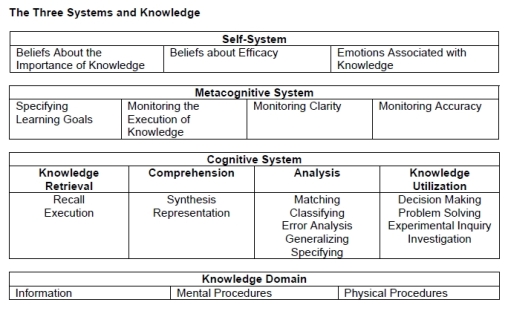
Marzano’s New Taxonomy of learning objectives

by Kimberly Matthews

Research question: How can we align the MOOC with Marzano’s levels of processing?

The MOOC included an interactive self-check, videos, quizzes, links, and two discussions per week

This research was exploratory. Quizzes were aligned with cognitive system; discussions aligned with metacognitive system; and self-checks and videos were aligned with the self-system.

Future work would include surveying students after they finish the MOOC; analyze student suggestions in the MOOC.

We got into an interesting discussion on videos. The participants didn’t like 3-5 minutes – they wanted them shorter. LIke maybe 30 seconds – just to capture interest. It was the self-checks – where they labelled things, moved things around, etc – that they really enjoyed. They wanted more of those. 

We got into another interesting discussion on self-directed learning – as more intrinsic and for yourself. But then do you need badges if you are doing self-directed learning? It’s like a basic level of gaming. I check things off; I get things checked off; I get a star. It connects to the quantified self movement. Culture is changing – and self-directed learning is growing and evolving.

What Instructional Designers do: take a learning framework and use it to guide the development of a course.

Reflection: This session showed the power of MOOCs as a source of research data. About 4500 students; about 400 finished; about 300 did the survey on the course. Still very high response rate for the students who completed. 

Five Science Teachers and a Banana: Are Traditional Labs Better Than Online Labs, or Just the Way it’s Always Been Done

Blogging the Online Learning Consortium International Conference 2014

Presenter: Jim Brinson, American Military University

All his presentation resources are online here

Photo Credit: Amy - Bio Lab
Photo Credit: Amy – Bio Lab

Different ways to do labs: hands-on manipulatives in person, remote labs, virtual labs, lab kits, etc.

Who is saying which method is more effective, why are they saying it, and based on what criteria? This is a paper that Jim is about to publish. Lesson for me in my budding research: write the journal article first, then use the conference presentation to get the word out and to find potential future research partners; to inspire future needed research; or to share additional results that weren’t included in the paper.

He developed a classification system that can be used for both online and non-traditional, and that can apply to all scientific disciplines.

The engineering lab lit review that he used to inspire his work is this paper: Ma, J., and Nickerson, J. V., “Hands-on, Simulated and Remote Laboratories: A Comparative Literature Review”, ACM Computing Surveys, (38:3) Article 7, 2006, pp. 1-24. pdf

There isn’t a central repository for this information, and so this research on traditional and non-traditional labs isn’t moving along very quickly.

Interesting things came up in the studies: geographic location of the studies, gender, level of the student, is there an equivalent learning for students.

Most undergrad labs are about following directions, getting a specific outcome, scientific communication, using and testing a hypothesis, etc.

This is the KIPPAS table that Jim created to categorize the outcomes of the various labs.

Most of outcomes measured in the lab studies were on Knowledge/Understand level. Hmm. Are we really doing in labs what we want to be doing?

The second highest is Perception – which is student’s interest in science. Labs make science interesting for the student.

The big question is, where do the students need the physical manipulatives? Student prior experience with the manipulatives is a consideration as well. Additional research is needed, which includes being really clear on which outcomes are being measured.

One of the participants shared how they offer a program with online and f2f delivery both; and when students get to the face to face clinical work in the hospital, they have the same success rates. Jim argued that we need to get more of these results published.

Reflection: I need to get this paper and share it with our faculty who are thinking of online labs. The issue of labs is really important for access to scientific learning experiences. In addition, how students learn various types of knowledge and skills is important as we try to deliver in a wider variety of ways. 

What I really appreciated about this presentation is digging down into the learning outcomes at the foundation of labs, and then considering from that foundation the issues of non-traditional labs. 

Advising for a New College Reality: Dual-credit High School Students in an Online University

Blogging the Online Learning Consortium International Conference 2014

Presenters: Daniel McCoy, Sophie Spratley, Jessa Carpenter (University of Florida)

UFL’s Concurrent Enrollment program website Nice example of resources that need to be built around the dual credit program

Interesting Notes

  • Trends: accelerated high school online (virtual schooling), home schooling – dual credit helps home school students transition to 4 year universities, advance placement exams, growth in dual enrollment in the Florida community colleges
  • F2F dual credit is seen as easier than AP, and online is seen as more difficult than AP
  • Issues: Students may not be prepared – the risk to their transcript. Creating a transcript early can be a high risk situation for the student. If they aren’t able to be successful, the result may affect their college future.
  • Advising: They created an advising syllabus so standardize the advising process and share expectations with students. The same best practices for advising apply online as well. Students need help choosing which courses. The advisor follows up with the student three times during the semester (before withdrawal, in the middle, and during exams). They have an intervention strategy, which includes at the extreme, calling parents if they aren’t hearing from the student. Building relationships with districts, faculty, parents, and students. The faculty can contact the advisors if students aren’t showing up. They offer the same services as Student Affairs and so maintain a relationship with them.
  • Case Management and Customer Service: These are critical foundations. They use a helpdesk software and make a ticket for each student, and then all the interactions with the student are recorded in that system. This is a cool idea and something to consider as we look to support our students.
  • Orientation: University policy, setting up their university email account, explaining how professor office hours work, being a good online learner, how to get into a routine online learning.
  • Email issues: They work really hard to get the students to use the university email, including emailing them back on their non-university account and telling them to check the university account for the answer.
  • Self-assessment: Students take a self-assessment to see if they are ready for online learning.

Tools

  • Redmine – tool for the helpdesk ticket already used inside the department.

Things to Apply

Some things that I think we could work on to improve and expand our courses for high school students:

  • Orientation
  • Self-assessment
  • Advising could be reviewed
  • Ways we deal with university email
  • FERPA considerations – they use a customer service method to teach parents about FERPA

Twelve Strategies to Promote Online Growth While Ensuring Quality

Blogging the Online Learning Consortium International Conference 2014

Presenters: Brian Udermann (University of Wisconsin-La Crosse, USA)Cristi Ford (University of the District of Columbia, USA)

Juggling concept: the more things you add for your online learning program, the more likely is that a ball will drop. It’s ok. Pick it up and keep moving forward.

Interesting Notes

  • 25 % of faculty think their institution are pushing online education too much (not the 85% we might think).
  • At the beginning they asked everyone to stand up, and then sit down if you don’t have this in place: one person who oversees online education; have an online advisory board; have an instructional designer; have policies and procedures.

Strategies and Audience Ideas

  1. Have one person who oversees online education for your campus. Don’t add it to someone else’s load as an add on to their other responsibilities. Include things like proctoring, policies, tutoring online, student services, support services – available for ALL online programs.
  2. Have an Online Advisory Board. Should include Faculty, students, administrators, business services, program directors, instructional designers, student support services.
  3. Offer high quality faculty development opportunities. Ideas include: Online learning competency assessment (for people who say they’ve taught online); Online learning academy (6 weeks in the summer for 3 days a week – for those who are totally new); OLC workshops; during the school year accelerated online learning academy; elearning scholars institute – OLC workshops for faculty who want to dabble in online learning. And then after they take the workshop, they teach it to other faculty at a brown bag lunch. Weekly sessions. Use tips and tools to get them in the door, and then teach them something about pedagogy.
  4. Create faculty buy-in. Consider what motivates and demotivates faculty. Student need is a very high motivator. A national credential for training. Something that recognizes faculty at graduation – like a stole to wear. Competencies are important.
  5. Hire an instructional designer. Best way to increase the quality of online learning at your institution. Create an online education factbook for your institution. Impact of online courses on the graduation rate. Impact of instructional designer on retention rate. Partner your ID with your “grumpy guy” to sell resistance faculty on online learning. Two models: they are a consultant and training or are they actually building and designing the course? Interesting thought: the ID on the higher ed side is similar to a media specialist on the K12 side. 
  6. Create a policies and procedures manual or handbook for online education. i.e. what are the policies: do we pay more for online courses? can I start my online course a week early? when do I give the final exam in my online course? can I teach my course through my personal blog? student evaluations of instructors, i.e. enrollment in online shouldn’t exceed face to face, dropping online courses, workload, response time, policy for changing instructors in the middle of the term, credit hour. Example of the online handbook at UWLAX. You might need a document with policies and a document with best practices. University approved policies, faculty expectations, best practices etc.
  7. Have a course review process in place. Examples: Quality Matters, Penn State Quality Standards, Lone Star College, Community of Inquiry, Quality Assurance Model Florida State.
  8. Provide financial support for training and course / program development. Give certificates, buy stoles, give incentives.
  9. Ensure high quality student support services for online learners. Library, student ID, assessment, communication, student communities, personal services, etc.
  10. Create a strategic road map for your institution. For example, who is responsible for these different issues and getting them done. How will you get there. Think logistically about what it takes.
  11. Collect and use data. Number of online courses, gen ed online courses, students taking online courses, graduation rate in six years if they took online course. Tell faculty about it – those who teach online, those who don’t. Share share.
  12. Dare to be different.

Things To Work On

  • An online program policies and procedures manual. This is ours and this is Brian’s. Improvements could be made on ours!
  • Have a workshop on ways to reduce cheating (same level of cheating for online and f2f)
  • Build more faculty training options
  • Intellectual property clarity. For example one option might be: university has a non-exclusive in perpetuity license for the content; and if the university funds creation of media, the university owns that media.

Bonus: Brian is an excellent example of how to interject humor into your teaching.

Leveraging the Investment in Online Education: A Workshop for Campus Leaders

Blogging the Online Learning Consortium International Conference 2014

Presenters: Mary Niemic, Dylan Barth, and Laura Pedrick

Interesting Notes

Investment
[Photo credit: LendingMemo.com]
New term: Nanodegrees. In the context of the different types of online learning – MOOCs, self-paced, competency based, credit, certificates, degrees, modules, etc.

Report: Online College Students 2014 (from LearningHouse). Reputation, price, credit transferability, and job credibility are important to students. Within 8 weeks of application, students want to be able to start their degree.

Support for Learning: The idea of integrating offices for learning technologies and professional development to one unit that supports all good teaching – online, blended, on campus. Active learning, blended learning, educational technologies, etc.

Resource: Scholarship of Teaching and Learning; UW Milwaukee is building a national database of research on online learning; with grants for others to participate in the research.

University of Nebraska High School – has existed since 1929 (kind of like Andrews University‘s Griggs International Academy that started in 1909). Only 11% of the enrollment in this HS are in Nebraska.

Critical success factors: mission and goals; goals aligned to specific metrics; sustainable resource management strategy, administrative structure, policies, systems, effective communication, comprehensive evaluation plan that drives future efforts.

Favorite quote: It’s not the flashiest thing that determines quality, it’s the thing that helps students learn the best; and the method of allowing for faculty presence.

Interesting Discussions

  • Choices
    Photo Credit: Akuppa John Wigham

    Enrollment Data. Do you count online learning in the fall with a census date, or do you count the full year? How to discuss counting with the rest of campus that is counting in the fall where it makes sense. But online students and coming and going all year long.

  • Honors. Who has honors options for online students? Most everyone in the room doesn’t – discussion of how all students have the right to access to honors programs; but there may be significant resistance on campus to offering honors options online.
  • Educational models that are changing – flipped, blended, competency, self-paced, shrinking semesters, synchronous or asynchronous. What are the benefits and challenges for each and which to choose for the degree? How to work with faculty who start with the idea that we just need to stream what is happening in the classroom? The online student doesn’t want the class on Tuesday at 2:30 pm; but how to assist faculty to realize students want to time-shift, and that is why they have chosen online learning. There isn’t really a huge market for synchronous learning.
  • Misunderstandings about what teaching is; what online learning is. The idea of “shrink-wrapping” a course by recording it and sending it to the student, with no other teaching included. A faculty member who wanted to be recorded so that when he died, his course could still be taught and his family could get the income. Misunderstandings about where the “teaching” happens in online learning, or even in f2f classes.
  • Revenue. Planning to do online learning just for the revenue tends to fail. Funding models: 5% of tuition to the central support of distance. Or 10% of the distance fees. Seed funding for new programs; and tuition/fee distribution to encourage continuity of offerings. Centralized vs decentralized, and how the funding models follow that. What the costs are for U Nebraska.
  • Traditional students. Traditional students who take online courses have a faster time to complete their degree; they are taking online courses to supplement during clinicals and practicums. Traditional students are interested in supplementing their on campus experience with online. Resources created to support online students can end up supporting the on campus as well – i.e. one stop shopping for all your university needs and records, etc. Lots of swirling among institutions and even between online and on campus enrollment.
  • Change. Supporting online learning can create additional capacity in the university for change. Course redesign, support services adjustments, all have benefits for the university as a whole for dealing with change and becoming more flexible.
  • Systems. For universities part of a system, do you have competing programs? or not? Using funding and marketing as carrot/stick to keep universities in the same system from offering competing programs. Using market research to determine what the students are interested in? Restricting online competition vs. allowing competition within the system face to face. System thinking – you aren’t stealing each other’s students, the community colleges are stealing your students.
  • Summer. High demand courses, high interest, finish in four, online courses for the summer.
  • Market saturation. The market is getting saturated for online learning – and it’s important to think about the market and what is already out there. The MBA is the most saturated online degree.
  • Definitions. What is blended? what about percentages? Recommendation to review UWM’s definition.
  • MOOCs. What are they good for? Brand recognition, fodder for research projects, service to the global community.

Interesting Companies and Resources

  • NetTutor for outsourcing or supplementing tutoring
  • LTI intergrations – there may be legal issues depending on the student data you are sending to the LTI integration sites
  • OER resources – contributing, using, participating
  • MapWorks – early intervention and student success
  • U of Texas Productivity Dashboard – how are students of various degrees doing after they graduate? what are the trends for employment?
  • LibGuides – libraries using a libguide to support the learning, courses, and programs
  • Toggl – a tool for time tracking to work on faculty work load issues

Good Ideas to Apply

  • Online orientations; including for on campus students who missed the on campus orientation
  • A short certificate for online and blended teaching, and then create a community of those participating. The course is evaluated the first time it’s taught online or blended, and then the faculty member receives a certificate.
  • Accountability metrics: target demographics, capacity , growth, graduate job placement, not too many metrics. Consistent follow through on reporting the metrics. Need to think more about our metrics & goals in the various areas. Is it possible to do across the university or only by program and degree? Use this to manage expectations – have a metric that is challenging and achievable.
  • Have a librarian dedicated to OER
  • Have a librarian dedicated to distance education
  • Have a librarian create a LibGuide for each online course (or maybe program)
  • Create a guide for department chairs on developing an Online or Blended program
  • Online Program Council – or peer groups for program-level peer-to-peer best practice sharing
  • Evaluation plan: course surveys, designing surveys at the course level, evaluation of support systems, data consistency across programs, continuous assessment; system/campus wide, monitoring what you have built

Final advice

  • Keep the principles forefront – why are we doing it? it’s really about the students – access and flexibility – we are trying to do what is in the best interest of the students

Faith Integration

Andrews University is a Christian school; and therefore faith integration in online learning is an important value and task. Among other statements, the Andrews University Mission Statement includes this: Andrews University students will seek knowledge as they understand life, learning, and civic responsibility from a Christian point of view. How this is done makes for interesting discussion and research. There are certainly many viewpoints on the best way to integrate faith and learning; as well as different views on what it really means.

Some core issues for online course development and teaching online at Andrews are:

  • How does your own faith experience intersect with your teaching and learning?
  • In what ways do you encourage students to consider the course content & discipline’s philosophy from a Christian point of view?
  • What can students learn or experience regarding civic responsibility from a Christian point of view?
  • What are the Biblical foundations that intersect with your course content (as applicable and appropriate)?

What could this look like in an online course? The evidence may come in instructor-student interaction, in discussion on how the Christian worldview intersects with the content knowledge, in how students are viewed and treated as whole persons made in the image of God, in the instructor’s teaching presence. Here are some examples:

Instructor Presence

  • Hosting and encouraging student participation in an online chapel
  • Tone of your interactions with students
  • Ways that you show students you care – praying for them, helping struggling students, etc.

Writing Assignments

Another common way to explore the intersection of a Christian worldview and course content is through discussion forums, essays, and/or writing assignments.

Teaching Civic Responsibility

Biblical Foundations

Are there any natural connections between Biblical perspectives and your course content? Here are a few examples to challenge your thinking:

Note that it is important that these connections be appropriate, thoughful, integrated, and respectful of other faiths represented in your classroom.

Hopefully these ideas provide some background to help you consider how a Christian worldview intersects with your course content – and how best to assist students in their own growth and understanding throughout the process.

Talk to your Instructional Facilitator for more ideas or assistance with applying these ideas to your course.  Find these tips and more online in the Online Course Development Support Site.