
Thinking About Skype

Lately I’ve been thinking a lot about Skype, and so here I’ll share some of my recent thoughts. I hope that you’ll join the thinking and discussion by commenting below!

My Own Use of Skype

I have used Skype for three or four years now. I use it at home to videoconference with family for holidays and special events. At work, I use Skype mainly as a chat tool to keep in touch with my videoconference colleagues – especially those at educational service agencies who have bridges. It’s so handy for troubleshooting when I’m on the phone with my school who is having trouble with a VC, and I can Skype the person hosting the VC on their bridge to brainstorm solutions. Once in a while I use Skype at work for a VC or phone conference, but very rarely.

My Schools and Skype

I have 70 schools with H323 videoconferencing, and we’ve invested a lot of time in creating a support structure and a menu of content to offer our schools. Up until last year, most of my districts were still using T1s as their connection to the Internet, so bandwidth has been (and still is in some cases) very tight and carefully monitored. Several of my districts block Skype due to concerns about the health of the school network. These challenges have mostly kept Skype off the radar in our districts.

One notable exception is a district using Skype to VC with a home-bound student for some daily instruction. There may be additional uses of Skype that I am unaware of.

Difference Between H323 and Skype

Just in case you’re not familiar with the difference between H323 videoconferencing and Skype videoconferencing, here’s a quick rundown:

  • Skype is free; H323 requires special videoconference equipment
  • H323 generally has good echo cancellation for classroom videoconferencing; Skype is designed for a person with a headset at a computer so echos can be a problem
  • H323 is standards based, so you can connect to any other H323 device; Skype requires Skype on the computer you connect to

Is H323 Dead?

Last week, TelBitConsulting did a review of Skype and asked if H323 videoconferencing is dead:

Well H.323 is not really dead, but, you get the idea, maybe….ah….read on.

Except in the corporate world where high definition is the thing, I believe, now, that the standards-based H.323 videoconferencing market may not reach the masses as I, many years ago, had hoped would happen.

Don’t get me wrong, videoconferencing will still be a mass market (not counting corporate, education, telemedicine where it is doing very well thank you) success, but, the new king of videoconferencing for the masses may be (already is?) the Internet-based free (or very low cost) applications using a computer (laptop, network, cell phone, or desktop) and a web cam (built in or added).

I keep wondering about the future of videoconferencing in schools. I see the value of all the content we’ve built up around H323, but I also see the barriers to schools using VC on a mass level (beyond 30%). Will a tool come along that helps more schools access VC content? Would Skype be that tool?

So next, here’s some of my thoughts on pros & cons:

Pros

Cons

  • Web cameras don’t usually allow camera presets and various views of the classroom
  • Does sharing the computer – a PPT presentation for example – work well enough for events like MysteryQuest?
  • Can’t do multipoint calls for events like MysteryQuest, ASK, etc?
  • Lots of H323 content providers not available via Skype
  • Hard to restrict how many calls occur at once in low bandwidth schools (easier with a VC cart)
  • Some school technology directors have valid concerns about Skype on their networks

Future Developments

I certainly plan to keep an eye on what is happening with Skype in schools. An interesting development is the OSU Internet2 team working on a Skype to H323 gateway. If regional service agencies could install a box like this to provide access to H323 content to schools with Skype, more schools could take advantage of the H323 content. I am anxious for this tool to become available to try out.

It’s hard to tell what is next for the videoconferencing world, but it seems that those of us in H323 videoconferencing should keep up on what is happening with Skype in schools as well. To that end, I’ve added a new tab to my blog to keep resources that I find about Skype. I will still spend the majority of my time on H323 videoconferencing, but I want to know what the “Skypers” are up to as well!

Your Turn

What do you think of Skype? Have you used it in your classroom? How would you compare it to H323 videoconferencing? What do you see as the future of VC in schools? Please comment!

Thinking about Vidyo

Still cleaning out draft blog posts…

In March I had a long conversation with a representative from Vidyo (a software company) because I want to understand where videoconferencing is going, and what options may be coming down the pike to do curriculum videoconferencing on a scale in every classroom. Before you read my scribbles, review this:

Trend

  • There is a movement to push the processing to the endpoint instead of the MCU: i.e. the Vidyo endpoint (desktop software).

What is SVC?

  • SVC is scaleable videoconferencing – but it doesn’t seem to connect to other svc vendors
  • Vidyo licensed their technology to Google and Cisco, but those are then proprietary, so they don’t connect to each other. I don’t really understand that yet.
  • Vidyo is using annex 6 part of the h.264 standards suite

How Do You Connect?

  • Connecting to other sites is done with a guest link (sending a URL). It uses up a $5 software install for them to download and install it, or if they have it already it doesn’t cost anything…  (you prebuy the software licenses).
  • To call in with H323 you dial alias@IP of of the gateway.
  • To call out to an H323 site it’s extension plus IP of the other site.

Cost Structure
I probably shouldn’t share the costs they gave me because they will change. But here’s what you’re looking at:

  • A per seat per year cost
  • A gateway server to connect to H323
  • A software license for the number of ports you want / multipoint calls
  • A portal server to manage the seats and licenses

I’m not sure about Vidyo for curriculum videoconferencing. There’s a lot of content providers out there via H323 that you would need the gateway server for; and if just a school bought that, you might as well get a nice H323 videoconferencing cart for the cost of the gateway server. But would it make sense to do this at a regional level? For a regional just getting started with VC? I don’t know.

Have any of you tried Vidyo and what do you think of it?

Comments about MysteryQuest

I’m cleaning out my draft posts, and I found this little gem from April when I was running so many MysteryQuests. I love kid comments!

It was great!  Problem solving at its best!  Really fun.  One student comment after I explained we would miss recess:  “That’s ok, this is a lot more fun than recess.”  Quite the compliment!  Thanks for making it possible. -Linda Cokley in Missouri

Keeping Track of Endpoints Part 2

Wow! What a great response to my question yesterday about keeping track of endpoints. Thank you to everyone who took the time to comment. If you are considering this same problem, be sure to read the comments to see the variety of solutions recommended.

GoogleDocs
I thought maybe you’d like to know what I decided. I ended up with a Google Document (not a spreadsheet!). I made one for each district, because my notes include district wide comments such as what kind of firewall they have, what their bandwidth situation is like, when they allow me remote management of the endpoints, whether I can load a directory on the endpoint, etc.

It looks something like this:

School Name

  • IP:
  • Alias:
  • Software:
  • Password:
  • Serial:

School Ph:
Contact Name

Capabilities

  • 384K
  • remote management?
Settings DONE

  • mute on auto answer
  • basic mode off

Known Issues

  • they tend to break cameras; not sure why

Maintenance Contract Status:

Updated in CAPspace?

Below that I have a notes section that has the most recent comments at the top and all of the notes are dated. The notes include installation information, trouble tickets, the channel for their TV, etc.

This is a morph from my “at a glance” paper sheet that I had before. I like to see all the info about a district and their endpoints at a glance. (None of my districts have more than 7 units.) This way when I test, upgrade, or connect one of the units, I know what the issues might be.

I can also color things red that need to be fixed/addressed. During the school year, I’m so busy with connecting and facilitating events that I can only jot down problems. Then in the summer I have to plow through all my scribbles to figure out what needs to be done. This way it can be right on the district page instead of all over the place.

Tandberg Management Suite

Several comments mentioned a management suite. We actually have a TMS box, it’s just been off for 3 years due to my frustration with it randomly assigning conferences when I need some calls to just dial into a straight IP on conference 1 (see here and here).

However, next week we’re going to get it up and running again and get some training on it. So for those of you who thought I should be using a management system, I will soon! But I still need a place to write notes, and some of my districts have their firewall configured so I can’t manage their untis. So my Google solution seems to be the best so far.

Thank you!

I think that post yesterday generated the most comments I’ve ever received! I’m so grateful for each of you who took the time to answer. I hope that the comments are useful to all of you reading this blog as well to me. Thanks for being part of  my PLN.

Keeping Track of Endpoints

For those of you who support more than one videoconference unit, how do you keep track of it all?

I’ve tried:

  • Excel spreadsheet
  • Filemaker Pro database
  • A tiny chart printed and kept on my desk

I’ve had info in three places before and am trying to consolidate. What best practice tips do you all have out there?

The type of information I’m keeping includes:

  • Contact info for the people involved
  • Serial numbers
  • Software revision
  • History of trouble tickets
  • History of issues/problems
  • IP and gatekeeper alias
  • In some cases endpoint LAN settings

How do you stay organized? Please comment!

Continuum of Videoconferencing

For the past several years, I’ve been using a slide with the continuum of videoconferencing technology in my workshops. I decided it’s time to write up my thoughts about this so we can all refer others to the choices for videoconferencing. This post was co-written with guest blogger Lori Colwill.

The continuum starts at the lowest level and moves up from there.

Desktop VC: Skype, iChat, etc.

  • Free
  • Proprietary (i.e. Skype only connects to Skype, iChat only connects to iChat, etc).
  • Disadvantage: Lack of echo-cancellation or stability of the call can make it difficult to use with a classroom of students
  • Disadvantage: Some security concerns for classroom use
  • Disadvantage: Lower quality and inability to connect to most content providers
  • Options: Skype, iChat, GoogleTalk, TokBox, TinyChat, FaceTime and others

Desktop VC: Open Source H.323

H323 is the standard for what is also referred to as IP based videoconferencing. With H323 you can connect to any other H323 device (in theory).

  • Free
  • Ekiga and XMeeting
  • Connects to most H323 standard videoconferencing units
  • Disadvantage: No echo-cancellation can make it difficult to use with a classroom of students

Desktop VC: H.323

  • LifeSize Desktop: software only; no server required (8/12/09: It’s SIP only; not H323) (3/4/11: If it’s installed with a server and bridge, you can connect to H.323)
  • Polycom PVX software: $120 ish plus webcam
  • Polycom CMA: desktop software that requires a server
  • Tandberg Movi: desktop software that requires a server
  • Echo-cancellation may be a problem
  • Rigging audio and video from a desktop system to work in a classroom can be challenging

Small Room Systems: Fixed Camera H.323

  • Under $5000
  • Polycom V500, VSX 5000
  • LifeSize Express w/Focus camera
  • Cameras have limited or no movement
  • Designed for small conference rooms, 3-7 people
  • Easy to receive content from content providers etc., but difficult to use to have students present for events like Read Around the Planet and other collaborative projects

Classroom Systems: H.323 SD

  • SD is standard definition
  • Range from $3000-$9000
  • Ask your vendor for an “entry level” unit
  • As of summer ’09 most of the schools and content providers I connect with have this level
  • The older units are “set top” units that were designed to sit on a TV; newer units separate camera & codec to accommodate flat screen monitors
  • Ability to connect a computer and document camera for presenting
  • Great camera movement, ideal for classrooms
  • Polycom VSX 7000  and 8000 series (older)
  • Polycom QDX (newer, faster, better, cheaper)
  • Tandberg 770, 880, 990 MXPs (older)

Classroom Systems: H.323 HD

  • HD: High definition.
  • To take full advantage of HD, calls need to be at 1-4 M. Most schools don’t have that bandwidth available; most content providers still make calls at 384K.
  • It’s an investment in the future of the technology. In theory, soon we’ll all have the bandwidth to upgrade to HD.
  • Lifesize Express, Express 200, Team MP, Team 200, Room, and Room 200
  • Polycom HDX 7000, 8000 9000 series
  • Tandberg QuickSet C20 (newer, entry level HD unit)
  • Tandberg Edge MXPs 75, 85, 95

VC CartCarts vs. Rooms

A few words about installing a “cart” vs. installing a “room”.

  • A cart installation is usually a classroom system (see above)
  • plus a monitor (or a projector i.e. Tandberg Media Place)
  • installed on a cart
  • with one microphone on a 30 foot cord that can be moved around the classroom easily as needed.
  • A simple remote can be easily learned by the videoconference coordinator.
  • It might include a document camera and a way to connect a computer.
  • A cart installation is usually under $10K.
  • A integrated room installation is often a classroom system
  • plus two to four monitors
  • with a presentation stand for teaching over videoconferencing
  • plus ceiling and/or desk microphones
  • plus a fancy lots of buttons touch panel for controlling the system (usually AMX or Creston)
  • plus lots of peripherals: computer, document camera, extra inputs, DVD/VCR

Classroom teachers are intimidated by room installations! So are students. The cart is much simpler and easier if you plan to use VC for curriculum videoconferencing. The room may be better for full length courses.

Telepresence

  • really fancy expensive executive meeting systems designed to make you feel like you’re in the same room
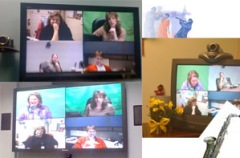
  • includes special paint and lighting
  • can’t see them used in schools anytime soon, but this is why you want to expose your students to VC – they will use it in their business work

Videoconference Network Infrastructure

If you are part of a videoconference network (through your state, region, or large school district), you may learn about videoconference network infrastructure.

  • MCUs: Bridges which allow multiple participants in multiple conferences at the same time
  • IP VCRs: Allows for recording and streaming of videoconference content
  • Firewall transversal units: Used to solve the challenges of H323 through your firewall (only get this if you can’t make it work any other way in my opinion)
  • Gateways for IP to ISDN, H.323 to voice, H.323 to SIP and H.323 to proprietary protocols (Thx Craig!)
  • Gatekeepers: for dialing plans
  • Management software: for places that manage many units: for scheduling, upgrading software, providing directory services, etc.

Freaked out?

Now that you see the big picture, what should you do? If at all possible, try for an entry-level unit or classroom H323 unit. Talk to your school district or regional tech and see what the plan for videocoferencing is for your area. You may have access to VC and not even know it!

Comments, thoughts? Favorite VC vendor missing? Please comment, share and add to our knowledge!

Revision 8/6/09 with LifeSize based on comments below.

4/9/10 Addition: You may also be interested in the VC Continuum in My Schools

How Do You Evaluate the Effectiveness of Your VC Program?

In the past month, I’ve been thinking and reading a lot about evaluation, particularly in light of my videoconferencing program at Berrien RESA. Evaluation is more than just counting how many videoconferences occurred (which is my usual pattern); it is determining the effectiveness of the program. To determine the effectiveness, we need to have some expected results, a way to measure them, and a way to find out if the program had the desired results.

What are the Expected Results?

One of the books I read on evaluation (McNeil et al., 2005) suggested that to evaluate a program, you should first consider what you expect the results of the program to be. So, what do you expect as the results of your curriculum videoconferencing program? What benefits do we expect for the students involved? We know that teachers see a benefit to their students, but what benefit is it specifically?

  • Motivation (for what? Learning?)
  • Achievement? (in specific content areas?)
  • Expanded learning opportunities
  • Interactivity?
  • Cross cultural exposure?
  • Increased communication skills?

How Can We Measure Those Results?

Next, we consider how we might measure those results. This is where I get seriously confused and unsure. Most of my teachers do one or two videoconferences a year. The highest is 12 videoconferences, and that was a preschool teacher with an am and pm class. So that was really just 6 videoconferences per class. Can six videoconferences in a school year make any measurable change in students? Can one videoconference make a measurable change beyond an anecdote?

  • If we expect increased motivation, is that measurable after just one videoconference? Two?
  • If we are measuring achievement, how would it be measured across my 70 schools with VC carts who use VC in a myriad of ways in the curriculum?
  • If we are measuring expanded learning opportunities, maybe we just count how many they did and leave it at that?
  • Do we determine the effectiveness of our videoconferences by how interactive they are? Do students learn more from a one-on-one vs. a view only session? Maybe. But sometimes the teacher needs to see a view-only before they will attempt a live interactive session.
  • If we are measuring cross cultural exposure, does a Michigan-Texas videoconference count? (That’s for you, Rox!) What about connections to zoos & museums?
  • How would we measure students’ increased communication skills? Teacher perceptions? Student surveys?

Measure Effectivness by Comparing Results

The next step would be to compare results to baseline data (before the program) and after the program. McNeil suggests using last year’s data as the baseline for this year.

But to do this, we have to resolve the issue of what is the benefit and can we measure it?

I’m not asking these questions because I don’t think there is a benefit. I do!! But can we get clearer and more articulate about the benefits of using curriculum videoconferencing? Can we improve our annual evaluations beyond just counting participation? Is it possible?

Reflection

The problem with asking these questions is it starts to make you think that videoconferencing may not be worth doing. But are the things worth doing only those we can measure? Certainly the current NCLB climate leans that direction.

How did schools justify in-person field trips? Should there be hard SBR data to prove that field trips to a zoo or museum are worth doing before we actually do them? Similarly, do short-term learning experiences like videoconferences need hard data to show it’s worth doing?

I don’t know the answers to these questions. But I sure want to talk to you all about them!! Please comment and share your thoughts/reactions to these questions even if you don’t have an answer either! Help me think about this!!

References

McNeil, K. A., Newman, I., & Steinhauser, J. (2005). How to be involved in program evaluation: What every administrator needs to know. Lanham, MD: Scarecrow Education.

Learning and Doing

Ok, this post isn’t tooooo closely tied to VC, but I want to keep these tweets somewhere close by! Thanks @cheryltice and @lcolwill for helping me find these!

They are all related to the idea that if you don’t use or experience knowledge, you haven’t really learned.

And the one that started my search:

@roxanneglaser: “@rhumgordon hmm. Now you are making me think. If you read and don’t do anything w/ the knowledge, do you learn?”

Makes you think, doesn’t it?!

Reflecting on Jazz and the Jazz Workshop

Last fall I attended an evening concert/lecture with Jazz Impact at the Banff Centre. I reflected then on the connections between jazz music and the 123 VC: Jazzing Up Your Curriculum with Videoconferencing. Today, as part of my Leadership PhD program, I’m attending an all day workshop with Jazz Impact. The lessons are still striking and applicable to the Jazz Workshop. So I write again, this time challenging those facilitating Jazz next week to reflect with me!

Jazz Lead Facilitators Meeting

There are five themes that make jazz music work:

  • Autonomy
  • Passion
  • Risk
  • Innovation
  • Listening

So here are some questions for you to think about your own participation and contribution to the “music” of the “Jazz workshop”. If you aren’t facilitating Jazz next week or participating, use these questions to think about a group of people you collaborate and work with.

Autonomy

  • Where do you have autonomy within the Jazz workshop?
  • How is your autonomy moderated/tempered by the relationship and dependence on the group?

Passion

  • How do you feel a sense of purpose in your work in the Jazz workshop?
  • Do you feel a sense of emotional commitment to the success of the workshop? (It’s the emotional commitment of the individual that sustains the strength and integrity of the organization as a whole.) So how are you emotionally committed to Jazz? How did you get emotionally committed to Jazz? What inspired it?
  • Do you feel that your potential and your voice is heard in the planning and implementing of the Jazz workshop?

Risk

  • Where is the uncertainty in the Jazz workshop?
  • How are the guidelines of our score simplified so that everyone can improvise from it? In Jazz, the score is simplified so that improvisation can occur around it.  (Compare a classical score to a jazz score: the key, 8 notes, the time. That’s it!) Have we simplified the score enough to allow for appropriate improvisation based on the needs of the participants?
  • Think “local activities”. Are they simple enough to allow for improvisation yet enough structure for the new facilitators? The construct of a jazz tune is: the tune, zone of improvisation, the tune at the end.
  • Do we have enough uncertainty? Does our “organization culture” allow for “competent mistakes?”

Innovation

  • Innovation is a relationship, a social function. How are you contributing to the innovation? How is the relationship with other Jazz facilitators inspiring your own innovation?
  • There’s a cycle of new musical ideas to structural foundation, to create new musical ideas to expanding the structural foundation, to expanding the musical ideas – i.e. a cycle of VC ideas, to a structural foundation – the basic structure of the Jazz workshop, to getting new VC and Web 2.0 ideas, to expanding the foundation, to getting even more ideas. Where are you in the cycle? Are you improving and expanding the ideas? Or are you improving and expanding the structure? or both?

Vicki Listening
Vicki Listening

Listening

  • Listening is a verb that generates cooperation. How are you listening to your lead facilitator? How are you listening to the other facilitators? How are you listening to the participants in the workshop?
  • Do you listen defensively, and only hear what you already know? Or are you able to listen with empathy to hear the new ideas from others?

Life is an echo – what you send out comes back. –Unknown

Teacher Comments on VC

This post is part of a series of posts with some of the results from a survey of my top VC-using teachers. Read more about it in the first post of this series. Remember, they are using videoconferencing to support curriculum instruction (not full length courses).

The question featured in this post is the last question in the survey:

Any Other Comments You Want to Share?

This is a qualitative representation of the results using Wordle. Click the graphic for a larger version.

Teacher Comments

Students and learning are front and center. Are you surprised? Here are some more comments:

This is a song we sang at our Read Across the Planet (to the tune of Twinkle Twinkle Little Star) Distance learning is a fabulous experience & I’m exceedingly thankful that I can give my kids the chance to be a part of it!

We hope you’ve enjoyed our show
Distance learning helps us grow
We learn to speak and to perform
We get to explore explore
We hope you’ve enjoyed our show
Distance learning helps us grow. – Heidi Clark, 1st grade teacher at Three Oaks Elementary, River Valley.

We enjoy the videoconferences and I feel that my students learn about themselves, the curriculum, and the world around them while participating. –Wendy Zahrn, 4th grade, Sylvester Elementary, Berrien Springs

This has been an exciting opportunity for our Preschoolers and created new methods of learning and teaching. –Esther Nixon, Preschool, Mars Elementary, Berrien Springs

The students gain so much from a VC that they are worth the time and effort involved. -Karen Ennesser, 7th grade science, Dowagiac Middle School, Dowagiac

My goal is to have videoconferencing right in my classroom. –Linda McConville, 4th grade, E. P. Clarke Elementary, St. Joseph

Videoconferencing is much easier than many think it to be. It is an excellent tool to share with your students. Real world/life plays a big part in this process. We are becoming a technological world and students will need these kinds of experiences to succeed. -Dori Hughes, 2nd grade, Eagle Lake Elementary, Edwardsburg

One of the 7th graders stated that the video conference was the most memorable activity for this school year. Students are “charged” to learn in this way. It’s a great tool to connect small-town students to the world around them. -Peggy Clore, 5-7th language arts, Coloma Middle School, Coloma

I am a big fan of videoconferencing because of the interactions of host and classroom. -Barb Vegter, 3rd grade, Countryside Charter

Videoconferencing has proven to be a great motivator of student interest. They enjoy the experience and invariably ask when we’ll do another. –Anonymous high school teacher

Reflecting on the process:

Did you get any ideas for your future program evaluations? I’m thinking that some of these questions could be easily made into a multiple choice to get more quantitative data to compare from year to year. I’m thinking I would also like to survey my teachers who have done a VC before, but didn’t do one this year. This could be very valuable data as well.

Did you find this little series helpful? What did you learn? Click comment below to share your thoughts.