
Solving Math Problems with 6th Graders

This post is cross-posted at the MACUL conference blog.

Another jam packed TWICE room (W2-66), this time with Danielle Letter, from Atkins Elementary in Saginaw, MI. We videoconferenced with 6th graders back in Atkins Elementary.

Here’s Danielle’s handout.

Danielle is giving us an experience with the type of videoconference called Math Maniacs. The kids read some math problems to us. We divided into groups and solved the problems while the students worked on solving some other math problems. Then we read some problems to the students… Some of the problem titles were:

  • Toothpick Problem
  • The Million Mystery

Danielle: Are you ready?

Kids: No, we’re not! This is HARD! They’re teachers!!

Both sides muted the microphone and worked on their math problems.

Danielle: All you need to do this is two classes, and some math problems. You can do it over videoconferencing, or Skype, or with an overhead projector with the class next door in your class. A document camera (Elmo, AverMedia, etc.) is helpful to share the math problem with the other site.

95% of what we learn is when we’re teaching someone else. So the students are teaching other students how they are solving their math problems.

Why do we use problem solving?

  • Because of the collaboration
  • Can be open ended
  • Can be not one right answer
  • Appeals to many learning styles
  • Encourages multiple strategies to solve the problem
  • Promotes stamina

Then we tried to solve our problems. Lots of quality work time, brainstorming and problem solving at both sites. See how one of the groups solved the toothpick problem.

After that, the 6th graders explained to us how they solved their problems, and we explained how we solved our problems. We learned about strategies guess and check, drawing a chart, acting it out…

Some student quotes on why they like problem solving:

  • It’s really good because you don’t just come up with the answer with a calculator. You use your mind by yourself and you feel really good. I like it because of the accomplishment.
  • I like it because it’s challenging. You have to do it over and over again until you get it. But you keep trying and get it and you realize that it’s worth finding the solution to it.

Nothing like hearing in the words of a kid!

At the end, our teachers didn’t want to share their answers, and the 6th graders said that we were camera shy. Everyone laughed!

Thanks Danielle, for showing us the cool ways to engage kids in teaching others and solving problems.

Links from my CAPspace / RAP Presentation

Follow-up from my Collaborations Around the Planet and Read Around the Planet session at the 2009 MACUL Conference in the TWICE room.

CAPspace MACUL 2009 PowerPoint

Collaborations Around the Planet

Read Around the Planet

Information for Collaborations

Projects Featured

My Upcoming Classes

More Info

  • Explore the tabs above to see my projects and my literature review in process.
  • Note that you can subscribe to my blog above using the RSS feeds or the email option (if you so choose).

Visiting Wales, then MSU Museum

This post is cross-posted at the MACUL conference blog.

It’s the first session after Alan November, and the TWICE room (W2-66) is jam packed with participants anxious to learn virtual field trips. Greg Marten, Lenawee ISD is presenting How Do I Find A Virtual Field Trip? Look TWICE!

After an introduction to videoconferencing, we connected to Lynsey Russell‘s class at Woodlands Elementary in Cwmbran, Wales to hear their Read Around the Planet presentation that they did with Ohio a couple weeks ago. The class started with a little introduction of geography of the UK. Then they sang us a song. The kids were so cute in their red, white and black uniforms. Huge round of applause from the teachers in the audience. We heard a Welsh song, and then a poem about a dragon in English. The poem was about the dragon who ate the school. Complete with actions and wonderful expression! Wonderful performance poetry.

One of the participants on the front row sang all the songs with the students and did the actions. She had Welsh background so that was a nice connection!

We had a chance to ask them questions:

  • What is the weather like?
  • What kinds of things do you do on the playground? (football, cricket, and basketball)
  • Do they learn Welsh in school?

After going to Wales, we got online for a while. People with laptops went to the TWICE website. The Projects section is where you can learn about connections like we did with Wales. The rest of the session focused on videoconference programs or field trips and how to search the Berrien RESA Videoconference Program Database. Participants learned about the TWICE discounts and other features.

Next, we headed over to the Michigan State University Museum to hear about their programs.

They gave us a tour of their studio – a little closet when you look offline. They have a green screen, which is of course very neat and makes it easy to see the visuals and the presenter at the same time. We got a nice overview of their programs: evolution, adaptations, and termites. We also heard crickets, saw pictures and video clips of various creatures. MSU Museum is one of the more affordable providers, with a cost of $50 per session.

If you haven’t seen a videoconference yet, plan to stop by the TWICE room (W2-66) for one of the upcoming sessions!

MysteryQuest and HistoryQuest Update

I just updated the MysteryQuest and HistoryQuest websites so you can see how many openings are left in each session. Some of the sessions are filling up quickly, others have a little more room.

MysteryQuest World Website

MysteryQuest USA Website

HistoryQuest 8 Website

HistoryQuest 5 Website

Note: If the $35 cost is a problem for you, I do have a few scholarships available, particularly for the middle school sessions (MQ World and HistoryQuest8). Please email me to discuss further.

Also, if you’re having any issues with equipment or verification in CAPspace so that you can register, I can help you past that little hurdle too.

Lit Review: Video Conferencing in the Classroom

Lit Review: This is a post in a series focusing on the research studies on videoconferencing.

Arnold, T., Cayley, S., & Griffith, M. (2004). Videoconferencing in the classroom: Communications technology across the curriculum. In T. Arnold (Eds.). Available from http://www.global-leap.com/casestudies/book2/index.htm

Summary: This book of 97 pages is still one of the best resources for an overview to videoconferencing and how to use it in the classroom/curriculum. Authors include Mike Griffith, of Global Leap fame. It was originally published in 2002 and was updated in 2004.

The first chapter reviews the components of videoconferencing and provides suggestions and guidelines on purchasing equipment. This of course is a little dated, with ISDN still listed first, and concerns expressed about the quality of videoconferencing over the regular Internet. These problems aren’t as much of an issue as they were in 2004 and earlier.

The Getting Started section has suggestions for setting up, getting training, and some introductory videoconferences just like Cheryl is offering for her schools. There are step by step guidelines for making your first exploratory sessions a success.

The next section has extensive detail on how to plan for “the use of videoconferencing across the curriculum.” For each major curriculum area, there are a plethora of ideas for collaborations as well as connecting to experts. Non-UK readers will need to translate the references to the Key Stages.

The next section gives a detailed overview of the Global Leap website and the resources and tools found there for subscribing schools.

Section E has detailed information on preparing for the videoconference, including a nice list of best practice tips. Section F goes into further detail on videoconferencing technology and all the options and choices, followed by a detailed glossary.

The authors reflect on the future of videoconferencing in Section H, with specific requirements that would be useful for vendors hoping to improve their products for educational videoconferencing.

Comments: If you’re new to videoconferencing, this book is a must read! Download it now and review it carefully. Even experienced VCers will find tips and tricks to make videoconferencing in the curriculum more effective.

Training Students on VC

I was reviewing two documents today – Owston’s 2007 study on the factors for sustainable innovation of technology, and Anderson and Rourke’s (2005) VC literature review.

Owston includes in his “essential conditions” the student support of the innovation. Anderson and Rourke find a “promising practice” in “student empowerment through operation with the technology.”

It just occurred to me that I haven’t thought too much about how to get students excited about videoconferencing. Mostly because they usually are automatically excited about it.

But haven’t you ever noticed students who are quite nervous about videoconferencing and want to stay off camera? I have noticed this  especially with middle and high school students.

So, here’s my question to all of us. How are we making sure students feel comfortable with videoconferencing before they go into a content specific VC? Arnold, Cayley and Griffith (2004) have some interesting ideas for “first time VCs”. Our connections with Mexico lately have been very low-key informal events. Our connection on Friday with the seniors in TX certainly broke the ice for students on both sides.

What do you think? Should we think about this more? Are there some more specific things we can do to make sure there is student support for VC in our schools? Please comment.

Read Around the Planet to SK, no, wait, TX!

subtitle: Twitter saves the day.

This afternoon we had a Read Around the Planet connection to Saskatchewan that fell through at the last minute. So I posted it at 12:15 to Twitter that I desperately needed an audience class, and by 12:30 I had a partner, thanks to Roxanne and Beth Alton.

Our class had been working on Japanese storytelling, called Kamishibai. The students wrote a story, then illustrated it with beautiful drawings on cards.  Here’s a sampling of the drawings. They were very nicely done.

Japanese storytelling

Several students also shared nice little write ups about Michigan, Stevensville, and their school. We were so grateful to have the students in Texas to be an audience for us.

Of course, then we had the question and answer part. Here is a sampling of some of their questions.

  • How cold is it?
  • Do you have Dr. Pepper?
  • What kind of food do you like? The Moody high school kids told us that they eat snakes and armadillos. But then after our kids reacted, they said they were kidding. Everyone laughed!
  • Do you have any beaches? (we do – Lake Michigan)
  • Do you have movie theatres? (both small towns)
  • What kind of music do you listen to? (from MI); What’s y’alls favorite band? (from TX)
  • Can we find your town on a map? (TX answer: maybe, it’s really small!)

Our kids loved to say “goodbye y’all” at the end. They said, “are y’all making fun of us?” No, we just think it’s cool! Thanks to Roxanne and Beth for saving the day!

Lit Review: The educational use of videoconferencing in the arts faculty

Lit Review: This is a post in a series focusing on the research studies on videoconferencing.

Badenhorst, Z., & Axmann, M. (2002). The educational use of videoconferencing in the arts faculty: Shedding a new light on puppetry. British Journal of Educational Technology, 33(3), 291-299. doi:10.1111/1467-8535.00264

Summary. This article summarizes a videoconference project where art students in South Africa videoconferenced with the Handspring Puppet Company in Cape Town, learned about the planning of an upcoming production, and then videoconferenced again immediately after the production was performed in Belgium.

The article describes each stage of the project. A detailed review of the different types of videoconferencing is included (but not IP H.323 videoconferencing because this was from 2002).

The article also reflects on the feedback from the learners and the assessement of the learning. The students were able to get immediate feedback to their questions and to see real-world applications of their learning.

They found that a well structured agenda with questions prepared ahead of time was crucial. Extensive preparation and organization was required to make the videoconference happen. This hints at the need for staff to coordinate and support videoconference. In addition, the authors suggest that a fixed room with appropriate lighting is best suited for the location of videoconference equipment. “There is justification for support personnel to maintain and run the eqiupment and leave the educators free to concentrate on the learning process” (p. 297).

Interestingly, this article defined Instructional Television (ITV) as two way audio and one way video. I haven’t see this definition before, but it makes sense and obviously at one point meant that. Shows how important terms can be, and how much they change.

Reflection: This article emphasized the importance of planning, organization and coordination, in addition to tech support. These are definitely important pieces for a successful implementation.

I wonder if they did any more VCs after this article, and what they are doing now!

Magnetism with the National Science Center

National Science CenterThis morning Watervliet South Elementary is connecting to the National Science Center for their program on Magnetism: A Strong Attraction.
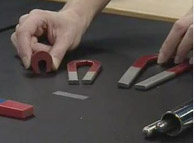
The program starts off with checking out the students’ prior knowledge about magnets. The presenter then shows the students various demonstrations and has the students predict what will happen. Students also learn about real National Science Centerlife applications, like cow magnets, and the monorail at Disney. She has some funny magnet jokes too!

The program is full of illustrations, demonstrations, and students predicting what might happen in various scenarios. Students were able to see the magnetic field, examples of natural magnets, and how a compass works.

Magnetic FieldWhile this program did not have a hands-on component, the students were still engaged in answering questions and predicting what might happen in each of the demonstrations. The visuals were rich, and students gained a better understanding of the concept of magnets.
Fort Worth Geometric Transformations

Today two 6th grade classes from Upton Middle School are connecting to Fort Worth Museum of Science and History for their Geometric Transformations program. We had a morning session, and now we have the afternoon session.

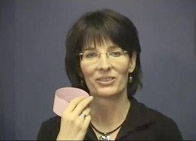
Fort Worth Museum of Science and HistoryAnne, the presenter, does a great job of breaking the ice at the beginning. She has some neat management tricks as well. She asks the teacher (by name) to call on students to answer. She asks the students to take a deep breath and hold it… “OK, now that you’re listening, you can breathe out.” She has a great rapport with middle school students and helps them feel comfortable with the program.
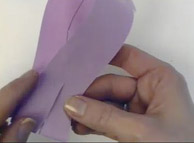
TFort Worth Museumhe program is built on hands-on activities done with strips of paper. Students fold, tape, predict what will happen, and draw on the shapes to test theories. Throughout the program, Anne asks the students to predict what will happen, asks them questions to probe their thinking, visualize what might happen if they cut in a specific place, and involves them fully. “I want everyone else to decide in your own mind what you think you will get.” Think time, and wait time are used judiciously throughout the program as well.

Fort Worth was the first Texas content provider to win the Teachers’ Choice Award that we run every year (they won last year). I can definitely see why. Their programs are full of interaction, student thinking, and hands-on engagement with the topic. This was our first program with them, and we will definitely be coming back again! My only wish is that their scheduling procedures were a little easier.