Tag Archives: Collaborations

Visiting Students in Mexico

Today I have two last minute planned videoconferences with Mexico. We had planned to have a Jr. High class connect yesterday, but they lost power. Their kids were so excited they wanted to talk to someone today. So last night I sent out an email to my schools and found two classes to connect and chat.

The connections are with the Pedro Zaragoza Foundation and Frank Garcia is the one coordinating. We found him on the CILC Collaboration Center.

Frank’s Dream
Frank is funding this foundation from his own pocket and with donations from local businesses. He’s bringing students from local schools, from the streets, and orphanages to videoconference with students in the United States. They share Mexican dances as well as just “getting to know you” interactions.

Frank would like to see classes in the United States sponsor children to go to school. For just $100 US, they can pay tuition and buy books and a backpack for one student. This seems like a great service learning project, similar to the VC for Hope project that Terry Godwaldt coordinates.

Mexico4th grade talks to 2nd grade
In our first session, the students had a simple exchange. To start off, one student at a time came up and said, “Hi, my name is ___, and I am ___ years old, and I like to _____.” Then the other class would say, Hola John! and wave. The kids loved it!

Both classes described where we were, and we showed them the bright white outside the window (snow!). One of our students played a few notes on a recorder, and the Mexican students clapped for her!

The two principals had a conversation; then the students sang a song for each other.

1st grade Spanish class talks to 2nd graders
In the second exchange, our students were starting to learn Spanish. They sang songs for each other, followed by more meet and greet time. All of the songs both classes shared were in Spanish. Our students had a song about the days of the week, and another for the colors.

We had a great time with these connections, and plan for more in the future. You can too! Just contact Frank!

What do you see as the power of collaboration?

I’m creating a new presentation for a workshop in Nebraska next week. It’s called “The Power of Collaboration.”

So, PLN, what do you think? Yes, YOU! You’re not just reading my blog, you’re part of my learning network!

What collaborations (in videconferencing) are you involved in? What types of collaboration do you do? So far I’ve thought of:

  • Collaborations between two classes of students
  • Collaborations between two or more videoconference coordinators in two different schools/districts
  • Collaborations between two teachers to team-teach
  • Collaborations that create content for students
  • Collaborations that students create content for other students
  • What else?

What is the power of collaboration?
What do you think? Here’s what I’ve thought of so far….

  • Broader perspectives
  • Better quality learning experiences
  • Expanded understanding of the world
  • Authentic audiences for students
  • Greater learning for everyone involved
  • A feeling of connection to a worldwide community
  • What else?

That’s the beginnings of my thoughts… do you have any to add? Please comment below!

Notes to my RAP teachers

Now that I’ve made it through organizing my 63 Read Around the Planet connections, I sent an email to my teachers on preparation. I haven’t done this before. Usually I trust to the email and my coordinators to make sure everything goes well. But this year I wanted to check up on the process a little more carefully. Here’s what I sent. Feel free to use it with your teachers if you want. (The interaction ideas are copied from the teacher packet.)

Greetings teachers,

By now you should have received an email with your partner information and date & time for Read Around the Planet. It came from admin@twice.cc. Please let me know if you didn’t receive it!

Communicate with your partner teacher
Please take some time in the next week to email or phone your partner teacher to let him/her know what you are planning.

Preparation Information
The teacher packet is online here: http://www.twice.cc/read/RAP-TeacherPacket.pdf
If you printed the one from the match email, please get this one instead because it’s newer and has more lesson ideas.

In particular, these ideas below can be used to increase the interaction – so it’s more than just two presentations and then Q&A.

Increasing Interaction

  • Ask your partner class questions related to your presentation as you go through. I.e. presenting state symbols: “What are your state symbols?”
  • Ask your partner class to guess something (i.e. who do the biography dolls represent).
  • Make statements about your class and have your partner class decide if they are
  • true (touch nose) or false (touch shoulders).
  • Share riddles for your partner class to solve.
  • Give the other class something to print and fill out (i.e. lyrics to a song and fill in the blanks).
  • Have your students dress up as a book characters and have the other class guess whom you represent.
  • For middle or high school students, have your students perform with the other class acting as judges.
  • Create a Mad-Lib for your partner class to complete.
  • Teach the other class something – a local saying, a local dance, how to make some local food, how to draw a book character, etc.
  • Research your partner class’ town and create a presentation about similarities and differences that you learn. Prepare questions about facts or news items that you find interesting or are curious about.
  • Play Wheel of Fortune with phrases, nouns, or sayings from your town or school. (This one should be 3rd grade or higher and watch the time!)
  • For older students – middle or high school – write a story about characters who journey between your town and you partner class’ town. Share it during the RAP connection. (If you really want to get creative, use a wiki to write collaboratively and then meet in the videoconference to present it.)
  • Play twenty questions. Be sure to review the rules of the game before you begin and give a clear idea of what they will be guessing. Example: You will be able to ask us 20 “yes” or “no” questions in order to figure out our mystery Dr. Seuss’ character.

As always, you can get assistance from me or your school videoconference coordinator.

What are your tips for keeping organized for Read Around the Planet and supporting your teachers? Please comment!

eTech Conference, OH

Greetings eTech Conference participants! Here are the links and resources mentioned in my session today.

Collaborations Around the Planet

Read Around the Planet

Information for Collaborations

More Information

"A Collaboration Nation"

In an “open letter to our government leaders,” Wainhouse Research recommends that the United States aim to be a “collaboration nation.”

The impact of turning the United States (or any other country) into an e-nation with an extensive telecommuting program could be sensational in turns of its high return, low cost, low risk, and immediate effect. Replacing 20M automobiles (a fraction of what is on the road today) with hybrids would cost approximately $500 billion while the investments to enable 20M telecommuters would be on the order of $2.5B. Taking 20M cars off the roads on a daily basis would save on emissions while also lightening the load on our nation’s highways.

A federal-government lead effort to become a “collaboration nation” should go a long way towards ridding our dependence on foreign oil and liberating our foreign policy, improving the environment, and helping the United States regain its leadership position in the global economy.

Read more here. What do you think? Visionary? Extravagant? Crazy? Are we too stuck on face to face communication? What do YOU think? Please comment….

Day 14: Questions, Questions? Questions!

20 Days to Being a Better VC CoordinatorThis week, we’ve been giving you tips to improve the quality of the interactions in your videoconferences. The question and answer time can be when the videoconference spirals out of control, or it can be a profitable learning experience.

Has this ever happened to you during Q&A time?

  • No one can think of a question until after you disconnect.
  • All the students start asking questions at once.
  • All the students answer the question at the same time and other class can’t hear the answer.
  • The students ask only questions such as, How long is your recess? and what are your favorite subjects?
  • The students can’t think of questions; so they ask the same questions that the other class just asked them.

Let’s Improve Those Questions

    1. Before the connection, learn a little about the location of your partner class. As a class, brainstorm some questions to learn more based on what you learned. For example, let’s say you’re connecting to a class in Midland, Michigan, which has a Dow Chemical Plant. Students might ask, how many of your parents work on the plant & what jobs do they do? Or, how does the chemical plant impact your community?
    2. During the connection, after each class has done their formal presentation, mute for 2 minutes to brainstorm questions. What could you ask the classes based on their presentations? What else do you want to know? You might even have some feedback/compliments to share with your partner class. For example, “We liked your PowerPoint presentation. Was it hard to find pictures for it? Where did you look?”
    3. Designate 3-5 students on a “question answer team.” These students are responsible for answering the questions from the partner class and make sure that one student answers at a time.
    4. Set up the question. Have the student(s) start with, Hi my name is _____. Then lead the question with a statement. For example, In our class, we have horses, dogs, cats and a lizard as pets. What pets do you have?
    5. When facilitating a multipoint session, don’t say, “Any questions?” Always call on schools by name (in the same order) so they know who should be talking.

    Comment Challenge/Comment

    • Try out one of these tips in your next videoconference. Tell us how it went.
    • Do you have any other question tips?
    • Do you have any stories of great questions students have asked?

    Comment and tell us about it!

    Day 10: Assisting Teachers with Preparation

    20 Days to Being a Better VC CoordinatorA critical part of a successful videoconference is preparation. So how can you help make sure it happens? Here are some ideas.

    Preparation Lesson Plans
    Many programs have preparation materials which are very helpful.

    • When the program is scheduled, ask the teacher if they received the materials.
    • A week or so before the program, ask the teacher if they were able to use the materials. Depending on how often you have VCs, you could plan an hour or so once a month/week to check in with the teachers who have upcoming VCs and see if they are getting the students prepared.
    • Some coordinators, depending on their position and other responsibilities, are able to actually do the preparation lessons with the students. Don’t do this more than once; encourage the teacher to team teach the next time; then maybe they can do it on their own. You’ll find it less stressful if you can move your teachers towards independence.

    Practicing
    When classes are presenting, encourage them to practice.

    • Practice in the classroom.
    • Practice with a fake mic.
    • Practice with the videoconference system.
    • Practice with the visuals. Make sure they are clear enough!

    When two of my schools were starting out with VC, the library aides took library time to connect to each other and have each student say a couple sentences on camera. The two classes just took turns until all the students had a turn. Every class participated. This broke the ice for all the students and teachers in each school!

    Explain VC to the Students Just Before the Program
    I encourage each of my coordinators to make sure students and teacher understand VC before the connection. Usually just a 2 minute little introduction before the program starts. Include:

    • Explain the video & audio quality – it’s not broadcast quality TV!
    • Explain where the mic is and that it can pick up rustling sounds.
    • The people at the other side can see & hear them.
    • Remind the students to speak up loudly and clearly.
    • Encourage them to represent their school with best behavior!

    We’ll talk about preparing questions and involving all the students in future posts.

    Other preparation tip lists online:

    comment1 Challenge Choices:

    • Find an upcoming videoconference on your schedule and ask the teacher how they are preparing for the videoconference. See if they need any assistance.
    • If preferred, write a little outline for your “speech” for before a videoconference.

    comment1 Comment:

    • How do you help teachers prepare for a videoconference? Any other tips?
    • What is hard about helping teachers prepare? Where do you get stuck?

    Day 9: Cancellations

    20 Days to Being a Better VC CoordinatorGuest blogged by Roxanne Glaser

    Sometimes life interrupts the best laid plans. You have worked with teachers and found content that fits with their curriculum. You submitted the paperwork. You have conducted test calls. You follow up with the teacher and you hear this, “I cannot do that videoconference.” What do you do?

    Let’s start with what not to do. Don’t yell. Don’t take it personally. Breathe in. Breathe out.

    Here are five tips for how to handle a cancellation

    1. Find out why the teacher is canceling.
    2. If the teacher is nervous or unsure about the event, contact facilitator or content provider for reassurance.
    3. Contact the content provider or facilitator of the session to find out if adjusting the schedule is possible. (NOTE: Be sure to read the cancellation policy of a content provider when you book the session. Some will charge a cancellation fee.)
    4. Try to find another teacher in your building to replace the class that is canceling.
    5. Communicate to all involved that the connection will not take place and diplomatically explain why.

    comment1 Challenge: Add a tip in the comments section that you have used in the past when a teacher cancels a connection.

    Day 8: Collaboration Sites and Listservs

    20 Days to Being a Better VC CoordinatorYesterday with Roxanne’s guidance, you set up accounts on the most common websites you’ll need to login to and register for videoconference programs.

    Today’s focus is on collaboration sites and listservs. This is your support community. You’ll learn from others, get ideas for using VC in the classroom, and even find out about new programs from content providers.

    Collaborations Around the Planet
    Also known as CAPspace, this site is where the popular Read Around the Planet registration and matching happens. By the way, today is the last day to register for RAP (and you have to have verified equipment already). CAPspace also allows you to post your own teacher-created collaborations to an audience of over 2000 educators (emailed daily).

    • For today’s challenge, work through the CAPspace scavenger hunt. At least, check your phone number and address, collect some badges, and set your privacy to Full if you want others to find you for collaborations.
    • If you already have your account set up, go to My Projects, Collaborations, and write up a past collaboration that you’ve done. This will add to your stars or “reputation” in the site. Make sure you mark it as Past or you’ll have partners signing up!

    Other Collaboration Sites
    Next, pick one of these collaboration sites that you haven’t explored yet. Get an account set up and explore it.

    Listservs
    Finally, are you on the popular videoconferencing listservs? If not, pick at least one and sign up for it. The easiest to sign up for is the Collaboration Collage.

    • Collaboration Collage: The oldest and largest VC listserv.  Listserv ended Fall 2010.
    • K-12 IVC (Established January 2003; CILC took on maintenance of this listserv in October 2008).
      • To subscribe to K12IVC@CILC, please send a blank e-mail to k12ivc-addme@cilc.net.
      • To unsubscribe to K12IVC@CILC, please send a blank e-mail to k12ivc-removeme@cilc.net.
      • To post a message to K12IVC@CILC, send it to K12IVC@cilc.net. You must be a subscriber to K12IVC to post.
      • To switch to digest mode, send an email to tstevens@cilc.org with the subject K12IVC@CILC.
      • For general list help, please contact tstevens@cilc.org.

    Challenge
    CommentDid you do all three challenges? Please comment and tell us what you thought!

    • CAPspace Scavenger Hunt
    • Sign up for another collaboration site
    • Sign up for a listserv

    CommentComment: Did I miss your favorite site? Do you have any other tips? Please share.

    Day 6: Promoting Videoconferencing in Your School

    Last week we focused on settings and such. This week in the 20 Day challenge we are looking at tips for before the videoconference – focusing especially on the nitty gritty of working with teachers.

    Today’s topic is how to hook teachers on videoconferencing and promote the possibilities of this technology within your school.

    TeacherIt’s the Curriculum!
    Owston (2007), in his study of schools implementing technology initiatives, found that teachers need to see the benefit to students before they will adopt a new technology tool. So, how do you help teachers see the benefit?

    • Use the correlations to national and state standards found in the popular database (Berrien RESA and CILC).
    • Use the Grade Level Guides to VC. Yes, they were done for Michigan and are now outdated even for Michigan curriculum, but they give a starting point for teachers.
    • Pick a couple willing teachers, find out what they are teaching for the next few months, and find a VC for them. Print the flyer or the program description for them. Put it in their mailbox. Start small like this, and then later teach them to find their own programs.
    • Help the teachers see how the programs fit their curriculum and help them teach that content better. Don’t push doing VCs just for the fun of it. Find the curriculum connection.
    • If you need help doing this, take Planning Interactive Curriculum Connections, a popular four week course for coordinators and teachers integrating VC in the curriculum.
    • Help teachers see how videoconferences meet their curriculum and can be used in place of some lessons to teach the same content.

    Of course, all of this takes time. So set yourself a reasonable goal of a few of the teachers/grade levels and target those. Then as they get comfortable, work on the others. Some teachers will probably never be enthusiastic about videoconferencing. Sweeney (2007) found that constructivist teachers were more likely to use videoconferencing in the curriculum. So, realize that and work with those who are interested.

    Experience is the Best Teacher
    Teachers need to see a videoconference to understand what will happen and to get over the fear of the unknown. In the words of one of our coordinators:

    It seems a little daunting until you actually go through it and then you realize this was not too bad and in fact it was really awesome!”
    • Don’t just TALK about videoconference opportunities in a staff meeting or workshop. CONNECT somewhere. Don’t let the content provider just TALK either. Have them demo the most interactive part of one of their programs. Try this list to get started.
    • Wherever possible, allow two teachers to do a videoconference together. Not all of the providers will allow 50-60 kids in a videoconference. However, going to the program “with someone” is much less threatening for first time VCers.
    • When one teacher is doing a videoconference, have the principal help you arrange for someone (maybe even yourself?) to cover for another teacher for a few minutes so they can see the videoconference.
    • For that matter, make sure your principal and superintendent experience a good videoconference too! Some principals in my area actually require each teacher to do one per year because they have seen the value to the students.

    Tell the Good News
    Make sure the staff hear about the great experiences by the participating teachers.

    • Get a write-up in the school newsletter.
    • Encourage your principal to let the teachers share their experiences at staff meeting. Let them hear from other teachers besides you!
    • When participating in Read Around the Planet, put up a bulletin board with a map with all of your RAP partner classes marked. Share the success!
    • Have the students present at a board meeting and share their experiences and what they learned.

    Advertising
    Figure out ways to stop being the middle man whenever possible.

    • If your educational service agency or district office provides scheduling services and sends info on an email list, get the teachers on the email list directly. This reduces time forwarding emails and soon teachers can do their own registrations (in some cases).
    • Use grade level or subject team lead teachers to help you promote VC. It helps a lot when the lead teacher for a grade level or subject area encourages everyone on their team to sign up for a videoconference. Train and support these teachers so they can help you.

    Be Sensitive
    In all your promotion, be sensitive to how teachers are doing with work in general. Several of my schools are doing less VCs this year because the science and social studies curriculum changed and everyone is just trying to stay above water dealing with the change. In another district, so much new technology is being installed so fast that teachers are quite resistant to do anything extra. Factors like these can affect the use of videoconferencing, and are beyond your control. If this is the case in your school, give yourself and your teachers a break and try again the next year!

    Wordle
    Finally, I’ve been sharing research results of a survey of my top teachers using videoconferencing from the 2007-2008 school year. One of my questions was – how did you come to know about videoconferencing? Invariably, their school coordinator helped them get excited about videoconferencing. What words stand out for you? (Click the picture to make it larger.)
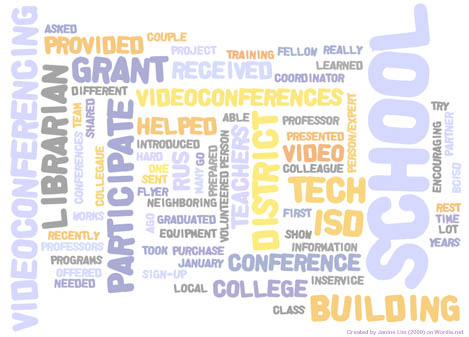
    Wordle

    So, Your Challenge Is:

    • Find one program that meets the curriculum for a teacher who hasn’t used VC yet.
    • OR Invite your principal to a videoconference (if you haven’t already).
    • OR Pick another of the suggestions above and make it happen!

    Please comment and tell us how it went!

    References
    Owston, R. (2007). Contextual factors that sustain innovative pedagogical practice using technology: an international study. Journal of Educational Change, 8(1), 61-77. doi:10.1007/s10833-006-9006-6
    Sweeney, M. A. (2007). The use of videoconferencing techniques which support constructivism in K–12 education. Retrieved from ProQuest Digital Dissertations. (AAT 3257352)